| GINO Graphics Suite - GINOGRAF v9.5 |  |
 |
| GINO Graphics Suite - GINOGRAF v9.5 | |
|
Complete chart drawing routines provide the user with the simplest path to obtaining output from GINOGRAF.
The routines described in this section are complete in themselves. The user simply provides the data in the appropriate array and makes a single routine call. The position and scaling of the chart is calculated automatically and output is drawn to fit the current graph drawing area as described in the main introduction. The numerical annotation on each axes is subject to the current settings of format and annotation control set by ggSetAxesAnnotation() and ggSetAxesAttribs().
The complete drawing routine to produce a 2D Histogram is:
ggPlotHistogram(ncols,yarray,frac,scy,vbeg,vend)This routine displays a data set made up of ncols values in the array yarray as ncols rectangular columns drawn between zero and the value in yarray.
The discrete axis is always drawn as the X axis having a range from vbeg to vend divided into ncols intervals. The Y axis covers the extent of all the values in the array yarray and may be drawn with linear or logarithmic scaling as defined by the parameter scy(GLINEAR=linear, GLOG10=logarithmic).
The routine allows control over the width of the Histogram bars by specifying the fraction frac of the largest possible bar width for the axis definition.
width of columns = ((length of discrete (X) axis)/ncols) * frac
The effect of various values of frac is shown under Histogram outline.
An example of output produced by ggPlotHistogram() is shown below:
 |
Example of ggPlotHistogram |
The following code shows the program that generated the above example followed by an equivalent program using the low-level component routines described in the following sections. The comparison is given because it is often desirable to make changes to the layout of a basic Histogram, but this is only possible by using the component routines, as the routine ggPlotHistogram() is provided to present user data as quickly as possible with the minimum of effort.
[C/C++]
/* USE OF COMPLETE HISTOGRAM DRAWING ROUTINE -
   ggPlotHistogram() */
#include <gino-c.h>
#include <graf-c.h>

int main(void) {
   float y[12] = {138.0,97.0,275.0,399.0,500.0,
      341.0,430.0,232.0,216.0,113.0,34.0,55.0};

   gOpenGino();
   xxxxx();
   ggSetGraphCharMode(GGINOMODE);

   ggPlotHistogram(12,y,0.9,GLINEAR,1.0,12.0);

   gSuspendDevice();
   gCloseGino();
   return(0);
}
[C/C++]
/* USING LOW LEVEL COMPONENT ROUTINES*/
#include <gino-c.h>
#include <graf-c.h>

int main(void) {
   float y[12] = {138.0,97.0,275.0,399.0,500.0,
       341.0,430.0,232.0,216.0,113.0,34.0,55.0};
    GCHASTY rep;
   GLIMIT lims;

   gOpenGino();
   xxxxx();
   ggSetGraphCharMode(GGINOMODE);

/* ENQUIRE GINOGRAF DRAWING LIMITS AND CHARACTER SIZE */
   ggEnqPlotFrame(&flg,&lims);
   gEnqCharAttribs(&rep);

/* SET UP AXES POSITIONS AND SCALES */
   ggSetAxesPos(GAXISSTART,9.0*rep.width,5.0*rep.height,
          lims.xmax-lims.xmin-12.0*rep.width,GXAXIS);
   ggSetAxesScaling(GDISCRETE,12,1.0,12.0,GXAXIS);
   ggSetAxesPos(GAXISSTART,9.0*rep.width,5.0*rep.height,
          lims.ymax-lims.ymin-10.*rep.height,GYAXIS);
   ggSetAxesScaling(GLINEARTYPE1,10,0.0,500.0,GYAXIS);

/* DRAW GRID */
   ggAddGrid(GINTERMEDIATE,GTICKS,GANNOTATION,GANNOTATION);

/* DRAW HISTOGRAM */
   ggAddHistogramOutline(12,y,0.9);

   gSuspendDevice();
   gCloseGino();
   return(0);
}
[F90]
! USE OF COMPLETE HISTOGRAM DRAWING ROUTINE -
! ggPlotHistogram()
use gino_f90
use graf_f90

  real, dimension(12) :: y = (/138.0,97.0,275.0,399.0, &
    500.0,341.0,430.0,232.0,216.0,113.0,34.0,55.0/)

  call gOpenGino
  call xxxxx
  call ggSetGraphCharMode(GGINOMODE)

  call ggPlotHistogram(12,y,0.9,GLINEAR,1.0,12.0)

  call gSuspendDevice
  call gCloseGino
  stop
  end
[F90]
! USING LOW LEVEL COMPONENT ROUTINES
use gino_f90
use graf_f90


  real, dimension(12) :: y = (/138.0,97.0,275.0,399.0, &
    500.0,341.0,430.0,232.0,216.0,113.0,34.0,55.0/)
  type (GCHASTY) rep
  type (GLIMIT) lims

  call gOpenGino
  call xxxxx
  call ggSetGraphCharMode(GGINOMODE)

! ENQUIRE GINOGRAF DRAWING LIMITS AND CHARACTER SIZE
  call ggEnqPlotFrame(flg,lims)
  call gEnqCharAttribs(rep)

! SET UP AXES POSITIONS AND SCALES
  call ggSetAxesPos(GAXISSTART,9.0*rep%width, &
          5.0*rep%height,lims%xmax-lims%xmin-12.0*rep%width,GXAXIS)
  call ggSetAxesScaling(GDISCRETE,12,1.0,12.0,GXAXIS)
  call ggSetAxesPos(GAXISSTART,9.0*rep%width, &
          5.0*rep%height,lims%ymax-lims%ymin-10.*rep%height,GYAXIS)
  call ggSetAxesScaling(GLINEARTYPE1,10,0.0,500.0,GYAXIS)

! DRAW GRID
  call ggAddGrid(GINTERMEDIATE,GTICKS,GANNOTATION,GANNOTATION)

! DRAW HISTOGRAM
  ggAddHistogramOutline(12,y,0.9)

  gSuspendDevice
  gCloseGino
  stop
  end
The complete drawing routine to produce a 2D Bar Chart is:
ggPlotBarChart(nbars,bars,frac,scx,scy,vbeg,vend)where nbars is the number of data pairs contained in the array bars (of type GBARCHART) which contain the start and finish values of each bar. The type of scaling and the orientation of the continuous axis (axis defining bar length) is defined by the parameters scx and scy. The discrete axis is annotated with nbars intervals between vbeg and vend.
The width of the bars is determined by setting frac, the fraction of the widest possible bar given the length of axis and the number of bars.
width of bars = ((length of discrete axis)/nbars) * frac
If frac = 1.0 then only the necessary lines are drawn (ie, lines common to two bars are omitted).
An example of output produced by ggPlotBarChart() is shown below:
 |
Example of ggPlotBarChart |
The following code shows the program that generated the above example followed by an equivalent program using the low-level component routines described in the following sections. The comparison is given because it is often desirable to make changes to the layout of a basic Bar Chart, but this is only possible by using the low level routines, as the routine ggPlotBarChart() is provided to present user data as quickly as possible with the minimum of effort.
[C/C++]
/* USE OF COMPLETE BARCHART DRAWING ROUTINE -
   ggPlotBarChart() */
#include <gino-c.h>
#include <graf-c.h>

int main(void) {
   GBARCHART bars[10] = {0.0,20.0,5.0,30.0,25.0,60.0,
       30.0,45.0,40.0,75.0,50.0,80.0,55.0,70.0,45.0,85.0,
       85.0,95.0,60.0,100.0};

   gOpenGino();
   xxxxx();
   ggSetGraphCharMode(GGINOMODE);

   ggPlotBarChart(10,bars,0.75,GLINEAR,GDISCRETE,1.0,10.0);

   gSuspendDevice();
   gCloseGino();
   return(0);
}
[C/C++]
/* USING LOW LEVEL COMPONENT ROUTINES */
#include <gino-c.h>
#include <graf-c.h>

int main(void) {
   int flg;
   GLIMIT lims;
   GCHASTY rep;
   GBARCHART bars[10] = {0.0,20.0,5.0,30.0,25.0,60.0,
       30.0,45.0,40.0,75.0,50.0,80.0,55.0,70.0,45.0,85.0,
       85.0,95.0,60.0,100.0};

   gOpenGino();
   xxxxx();
   ggSetGraphCharMode(GGINOMODE);

/* ENQUIRE GINOGRAF DRAWING LIMITS AND CHARACTER SIZE */
   ggEnqPlotFrame(&flg,&lims);
   gEnqCharAttribs(&rep);

/* SET UP AXES POSITIONS AND SCALES */
   ggSetAxesPos(GAXISSTART,9.0*rep.width,
          5.0*rep.height,lims.xmax-lims.xmin-12.0*rep.width,GXAXIS);
   ggSetAxesScaling(GLINEARTYPE1,11,0.0,100.0,GXAXIS);
   ggSetAxesPos(GAXISSTART,9.0*rep.width,
          5.0*rep.height,lims.ymax-lims.ymin-10.0*rep.height,GYAXIS);
   ggSetAxesScaling(GDISCRETE,10,1.0,10.0,GYAXIS)

/* DRAW GRID */
   ggAddGrid(GINTERMEDIATE,GTICKS,GANNOTATION,GANNOTATION);

/* DRAW BAR CHART */
   ggAddBarChartOutline(10,bars,0.75);

   gSuspendDevice();
   gCloseGino();
   return(0);
}
[F90]
!  USE OF COMPLETE BARCHART DRAWING ROUTINE -
! ggPlotBarChart()
use gino_f90
use graf_f90

  type (GBARCHART), dimension(10) :: bars = &
    (/GBARCHART(0.0,20.0),GBARCHART(5.0,30.0), &
      GBARCHART(25.0,60.0),GBARCHART(30.0,45.0), &
      GBARCHART(40.0,75.0),GBARCHART(50.0,80.0), &
      GBARCHART(55.0,70.0),GBARCHART(45.0,85.0), &
      GBARCHART(85.0,95.0),GBARCHART(60.0,100.0)/)

  call gOpenGino
  call xxxxx
  call ggSetGraphCharMode(GGINOMODE)

  call ggPlotBarChart(10,bars,0.75,GLINEAR,GDISCRETE,1.0,10.0)

  call gSuspendDevice
  call gCloseGino
  stop
  end
[F90]
! USING LOW LEVEL COMPONENT ROUTINES
use gino_f90
use graf_f90

  integer flg
  type (GLIMIT) lims
  type (GCHASTY) rep
  type (GBARCHART), dimension(10) :: bars = &
    (/GBARCHART(0.0,20.0),GBARCHART(5.0,30.0), &
      GBARCHART(25.0,60.0),GBARCHART(30.0,45.0), &
      GBARCHART(40.0,75.0),GBARCHART(50.0,80.0), &
      GBARCHART(55.0,70.0),GBARCHART(45.0,85.0), &
      GBARCHART(85.0,95.0),GBARCHART(60.0,100.0)/)

  call gOpenGino
  call xxxxx
  call ggSetGraphCharMode(GGINOMODE)

! ENQUIRE GINOGRAF DRAWING LIMITS AND CHARACTER SIZE
  call ggEnqPlotFrame(flg,lims)
  call gEnqCharAttribs(rep)

! SET UP AXES POSITIONS AND SCALES
  call ggSetAxesPos(GAXISSTART,9.0*rep%width, &
    5.0*rep%height,lims%xmax-lims%xmin-12.0*rep%width,GXAXIS)
  call ggSetAxesScaling(GLINEARTYPE1,11,0.0,100.0,GXAXIS)
  call ggSetAxesPos(GAXISSTART,9.0*rep%width, &
    5.0*rep%height,lims%ymax-lims%ymin-10.0*rep%height,GYAXIS)
  call ggSetAxesScaling(GDISCRETE,10,1.0,10.0,GYAXIS)

! DRAW GRID
  call ggAddGrid(GINTERMEDIATE,GTICKS,GANNOTATION,GANNOTATION)

! DRAW BAR CHART
  call ggAddBarChartOutline(10,bars,0.75)

  call gSuspendDevice
  call gCloseGino
  stop
  end
The Complete Drawing routine to produce a Step Chart is:
ggPlotStepChart(nsteps,steps,base,scx,scy,drop)This routine displays an annotated set of axes scaled automatically to include all the data. The data set held in the array steps (of type GSTEPCHART) is represented as a series of steps between corresponding values of steps.s and steps.f on the X axis, at a height held in steps.h on the Y axis, or a series of variable width columns between corresponding values of steps.s and steps.f on the X axis with a height shown between a base value (base) and the corresponding value held in steps.h on the Y axis.
The choice of step or column is determined by the parameter drop, where drop= GDROPTYPE0 displays only the step heights, drop=GDROPTYPE1 displays the vertical between adjacent steps (ie, steps.s(i) = steps.f(i)), drop=GDROPTYPE2 displays step edges except between adjacent steps (steps.s(i) = steps.f(i)) and drops down to base at the edge of a set of adjacent steps and drop=GDROPTYPE3 displays columns down to base for every height.
Linear or logarithmic scaling may be used on either axis depending on the value of scx and scy, with scx/scy=GLINEAR producing linear scaling on both axes.
An example of output produced by ggPlotStepChart() (with drop = GDROPTYPE2) is shown below:
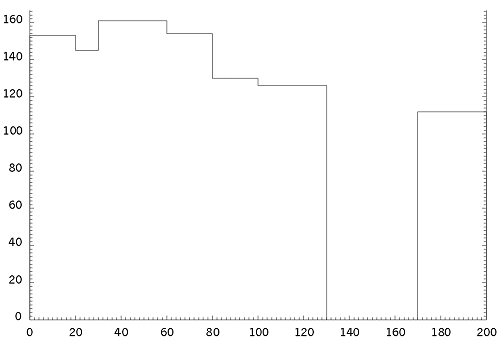 |
Example of ggPlotStepChart |
The following code shows the program that generated the above example followed by an equivalent program using the low-level component routines described in the following sections. The comparison is given because it is often desirable to make changes to the layout of a basic Step Chart, but this is only possible by using the low level routines, as the routine ggPlotStepChart() is provided to present user data as quickly as possible with the minimum of effort.
[C/C++]
/* USE OF COMPLETE STEPCHART DRAWING ROUTINE - ggPlotStepChart() */
#include <gino-c.h>
#include <graf-c.h>

int main(void) {
   GSTEPCHART steps[7] = {0.0,20.0,153.0,
       20.0,30.0,145.0,30.0,60.0,161.0,
       60.0,80.0,154.0,80.0,100.0,130.0,
       100.0,130.0,126.0,170.0,200.0,112.0};

   gOpenGino();
   xxxxx();
   ggSetGraphCharMode(GGINOMODE);

   ggPlotStepChart(7,steps,0.0,GLINEAR,GLINEAR,GDROPTYPE2);

   gSuspendDevice();
   gCloseGino();
   return(0);
}
[C/C++]
/* USING LOW LEVEL COMPONENT ROUTINES */
#include <gino-c.h>
#include <graf-c.h>

int main(void) {
   GSTEPCHART steps[7] = {0.0,20.0,153.0,
       20.0,30.0,145.0,30.0,60.0,161.0,
       60.0,80.0,154.0,80.0,100.0,130.0,
       100.0,130.0,126.0,170.0,200.0,112.0};
   GLIMIT lims;
   int flg;

   gOpenGino();
   xxxxx();
   ggSetGraphCharMode(GGINOMODE);

/* ENQUIRE GINOGRAF DRAWING LIMITS AND CHARACTER SIZE */
   ggEnqPlotFrame(&flg,&lims);
   gEnqCharAttribs(&rep);

/* SET UP AXES POSITIONS AND SCALES */
   ggSetAxesPos(GAXISSTART,9.0*rep.width,
       5.0*rep.height,lims.xmax-lims.xmin-12.0*rep.width,GXAXIS);
   ggSetAxesScaling(GLINEARTYPE1,11,0.0,200.0,GXAXIS);
   ggSetAxesPos(GAXISSTART,9.0*rep.width,
       5.0*rep.height,lims.ymax-lims.ymin-10.0*rep.height,GYAXIS);
   ggSetAxesScaling(GLINEARTYPE1,10,0.0,180.0,GYAXIS);

/* DRAW GRID */
   ggAddGrid(GINTERMEDIATE,GTICKS,GANNOTATION,GANNOTATION);

/* DRAW STEP CHART */
   ggAddStepChartOutline(7,steps,0.0,GDROPTYPE2,GXAXIS);

   gSuspendDevice();
   gCloseGino();
   return(0);
}
[F90]
!  USE OF COMPLETE STEPCHART DRAWING ROUTINE -
! ggPlotStepChart()
use gino_f90
use graf_f90

  type (GSTEPCHART), dimension(7) :: steps = &
    (/GSTEPCHART(0.0,20.0,153.0), &
      GSTEPCHART(20.0,30.0,145.0), &
      GSTEPCHART(30.0,60.0,161.0), &
      GSTEPCHART(60.0,80.0,154.0), &
      GSTEPCHART(80.0,100.0,130.0), &
      GSTEPCHART(100.0,130.0,126.0), &
      GSTEPCHART(170.0,200.0,112.0)/)

  call gOpenGino
  call xxxxx
  call ggSetGraphCharMode(GGINOMODE)

  call ggPlotStepChart(7,steps,0.0,GLINEAR,GLINEAR,GDROPTYPE2)

  call gSuspendDevice
  call gCloseGino
  stop
  end
The Complete Drawing routine to produce an Area Chart is:
ggPlotAreaChart(nareas,areas,scx,scy)This routine displays an annotated set of axes scaled automatically to include all the data. The data set held in the array areas (of type GAREACHART) is represented as nareas areas between the corresponding coordinates areas.s, areas.h1 and areas.f, areas.h2 where areas.s and areas.f are positions on the X axis, and areas.h1 and areas.h2 are on the Y axis.
Linear or logarithmic scaling may be used on either axis depending on the value of scx and scy, with scx=scy=GLINEAR producing linear scaling on both axes.
An example of output produced by ggPlotAreaChart() is shown below:
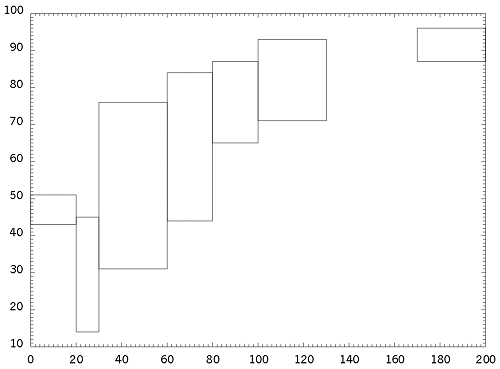 |
Area Chart |
The following code shows the program that generated the above followed by an equivalent program using the low-level component routines described in the following sections. The comparison is given because it is often desirable to make changes to the layout of a basic Area Chart, but this is only possible by using the low level routines, as the routine ggPlotAreaChart() is provided to present user data as quickly as possible with the minimum of effort.
[C/C++]
/* USE OF COMPLETE AREA CHART DRAWING ROUTINE
   ggPlotAreaChart() */
#include <gino-c.h>
#include <graf-c.h>

int main(void) {
   GAREACHART area[7] = {0.0,20.0,43.0,51.0,
       20.0,30.0,14.0,45.0,30.0,60.0,31.0,76.0,
       60.0,80.0,44.0,84.0,80.0,100.0,65.0,87.0,
       100.0,130.0,71.0,93.0,170.0,200.0,87.0,96.0};

   gOpenGino();
   xxxxx();
   ggSetGraphCharMode(GGINOMODE);

   ggPlotAreaChart(7,area,GLINEAR,GLINEAR);

   gSuspendDevice();
   gCloseGino();
   return(0);
}
[C/C++]
/* USING LOW LEVEL COMPONENT ROUTINES */
#include <gino-c.h>
#include <graf-c.h>

int main(void) {
   GAREACHART area[7] = {0.0,20.0,43.0,51.0,
       20.0,30.0,14.0,45.0,30.0,60.0,31.0,76.0,
       60.0,80.0,44.0,84.0,80.0,100.0,65.0,87.0,
       100.0,130.0,71.0,93.0,170.0,200.0,87.0,96.0};

   int flg;
   GLIMIT lims;
   GCHASTY rep;

   gOpenGino();
   xxxxx();
   ggSetGraphCharMode(GGINOMODE);

/* ENQUIRE GINOGRAF DRAWING LIMITS AND CHARACTER SIZE */
   ggEnqPlotFrame(&flg,&lims);
   gEnqCharAttribs(&rep);

/* SET UP AXES POSITIONS AND SCALES */
   ggSetAxesPos(GAXISSTART,9.0*rep.width,
       5.0*rep.height,lims.xmax-lims.xmin-12.0*rep.width,GXAXIS);
   ggSetAxesScaling(GLINEARTYPE1,11,0.0,200.0,GXAXIS);
   ggSetAxesPos(GAXISSTART,9.0*rep.width,
       5.0*rep.height,lims.ymax-lims.ymin-10.0*rep.height,GYAXIS);
   ggSetAxesScaling(GLINEARTYPE1,10,10.0,100.0,GYAXIS);

/* DRAW GRID */
   ggAddGrid(GINTERMEDIATE,GTICKS,GANNOTATION,GANNOTATION);

/* DRAW AREA CHART */
   ggAddAreaChartOutline(7,area,GXAXIS);

   gSuspendDevice();
   gCloseGino();
   return(0);
}
[F90]
! USE OF COMPLETE AREA CHART DRAWING ROUTINE
! ggPlotAreaChart()
use gino_f90
use graf_f90


  type (GAREACHART), dimension(7) :: area = &
    (/GAREACHART(0.0,20.0,43.0,51.0), &
      GAREACHART(20.0,30.0,14.0,45.0), &
      GAREACHART(30.0,60.0,31.0,76.0), &
      GAREACHART(60.0,80.0,44.0,84.0), &
      GAREACHART(80.0,100.0,65.0,87.0), &
      GAREACHART(100.0,130.0,71.0,93.0), &
      GAREACHART(170.0,200.0,87.0,96.0)/)

  call gOpenGino
  call xxxxx
  call ggSetGraphCharMode(GGINOMODE)

  call ggPlotAreaChart(7,area,GLINEAR,GLINEAR)

  call gSuspendDevice
  call gCloseGino
  stop
  end
[F90]
! USING LOW LEVEL COMPONENT ROUTINES
use gino_f90
use graf_f90

  type (GAREACHART), dimension(7) :: area = &
    (/GAREACHART(0.0,20.0,43.0,51.0), &
      GAREACHART(20.0,30.0,14.0,45.0), &
      GAREACHART(30.0,60.0,31.0,76.0), &
      GAREACHART(60.0,80.0,44.0,84.0), &
      GAREACHART(80.0,100.0,65.0,87.0), &
      GAREACHART(100.0,130.0,71.0,93.0), &
      GAREACHART(170.0,200.0,87.0,96.0)/)
  integer flg
  type (GLIMIT) lims
  type (GCHASTY) rep

  call gOpenGino
  call xxxxx
  call ggSetGraphCharMode(GGINOMODE)

! ENQUIRE GINOGRAF DRAWING LIMITS AND CHARACTER SIZE
  call ggEnqPlotFrame(flg,lims)
  call gEnqCharAttribs(rep)

! SET UP AXES POSITIONS AND SCALES
  call ggSetAxesPos(GAXISSTART,9.*rep%width, &
       5.*rep%height,lims%xmax-lims%xmin-12.*rep%width,GXAXIS)
  call ggSetAxesScaling(GLINEARTYPE1,11,0.,200.,GXAXIS)
  call ggSetAxesPos(GAXISSTART,9.*rep%width, &
       5.*rep%height,lims%ymax-lims%ymin-10.*rep%height,GYAXIS)
  call ggSetAxesScaling(GLINEARTYPE1,10,10.,100.,GYAXIS)

! DRAW GRID
  call ggAddGrid(GINTERMEDIATE,GTICKS,GANNOTATION,GANNOTATION)

! DRAW AREA CHART
  call ggAddAreaChartOutline(7,area,GXAXIS)

  call gSuspendDevice
  call gCloseGino
  stop
  end
Under the default conditions, the ggPlotStepChart() and ggPlotAreaChart() routines will draw a chart representing the full range of the X and Y data, calculating sensible axes intervals according to the current drawing area. The routine ggSetGraphScaling() can be used to add control over the ranges and intervals of the X and Y axes for this type of chart.
ggSetGraphScaling(mode)where mode can be one of the following:
| GDEFAULT | set the default conditions |
| GEQUALLIMITS | set both axes to have the same limits (to include both data ranges) |
| GEQUALRANGES | set both axes to have the same range of data |
| GEQUALGRAPHINTERVALS | set both axes to have equal sized intervals (in graph coordinates) |
| GEQUALSPACEINTERVALS | set both axes to have equal sized intervals (in space/physical coordinates) |
The GEQUALSPACEINTERVALS mode will result in a square grid, but may have the effect of reducing the length of one axis within the specified drawing area in order to maintain sensible numerical intervals on the axes.